
Supply Chain Platform
Redesigning Shipment Management for Complex Logistics Operations
1
Project details
- Product: Shipment module | B2B enterprise solution
- Role: Product designer
- Team: Product lead (Michael), Senior product manager(Su Xian), Developers
- Tool: Figma, Confluence, Jira, Miro
My Contribution
I was responsible for UX research, information architecture, interaction design, UI design, prototyping, and design handoff. I worked closely with product and engineering to translate changing business and data requirements into a usable experience.
2
The Challenge
The existing experience was not keeping up with the complexity of the product
The Shipment Management module is used by logistics operations teams to monitor shipments, identify issues, investigate exceptions, and keep deliveries moving smoothly.
Users could find basic shipment information, but we found several problems made operational tasks harder than they needed to be from user feedback.
At the same time, the product itself was undergoing a fundamental change.
This meant the challenge was bigger than improving the existing UI.
3
Understanding the Problem
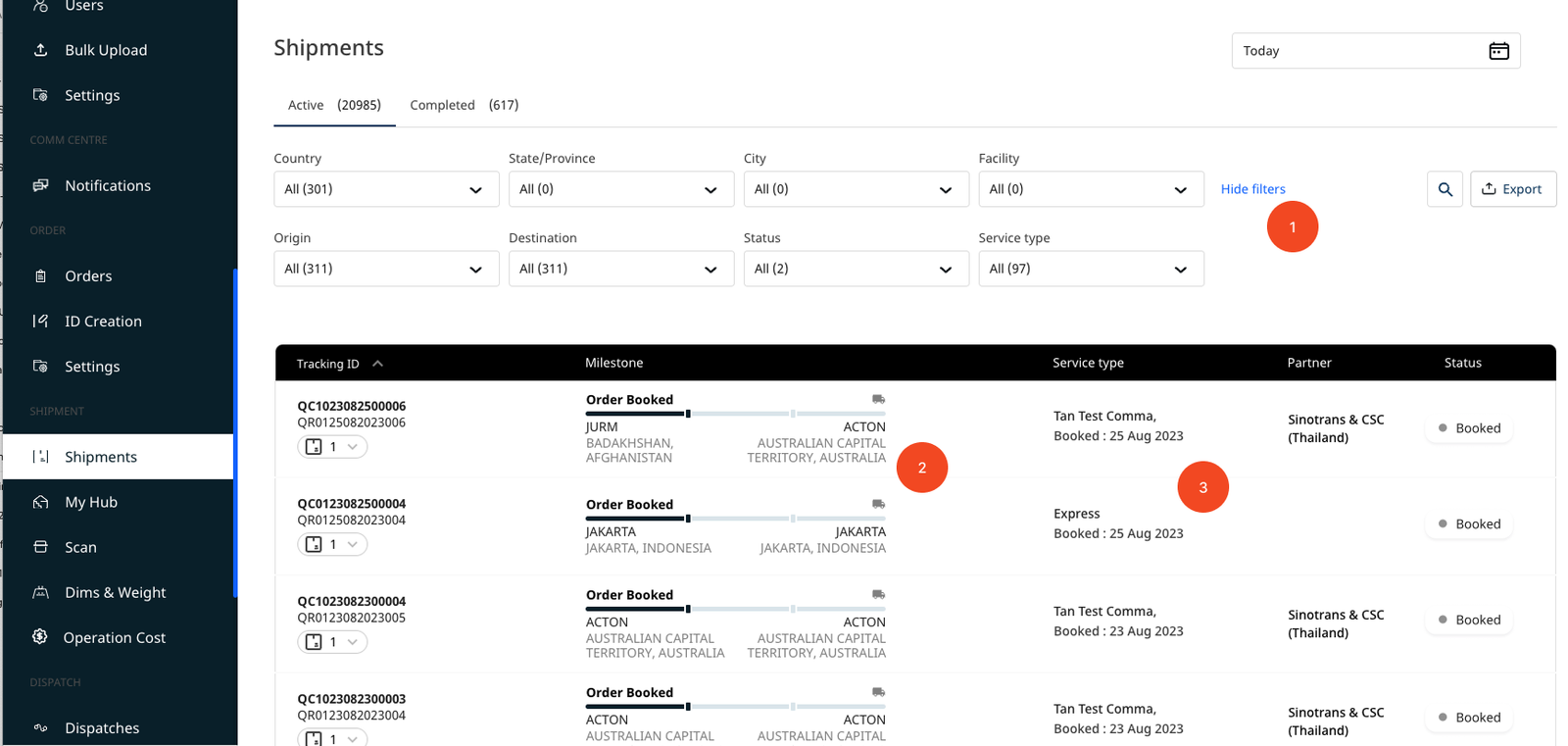
To understand how the existing experience was performing, I reviewed:
- User feedback
- CES and NPS survey responses
- Support queries
- Heuristic evaluation of the existing experience
Three recurring problems emerged:
1. Finding shipments was difficult
Users found the existing filtering experience confusing and had difficulty quickly narrowing down a large shipment list.
2. Shipment progress was difficult to interpret
The existing status model did not always communicate where a shipment actually was, particularly when a shipment involved multiple journey stages.
Booked → In Progress → Delivered
3. ETA and journey information lacked clarity
Users needed a clearer understanding of what had happened, where the shipment currently was, and what was expected to happen next.
Research signals
21 users responded to the CES survey, with 63.9% rating the experience 5–7 out of 7.
The NPS score was 4.
I treated these metrics as directional signals rather than definitive measures of the redesign. The qualitative feedback and interface review were more useful for identifying the specific workflow problems that needed to be addressed.
4
Reframing the Product Challenge
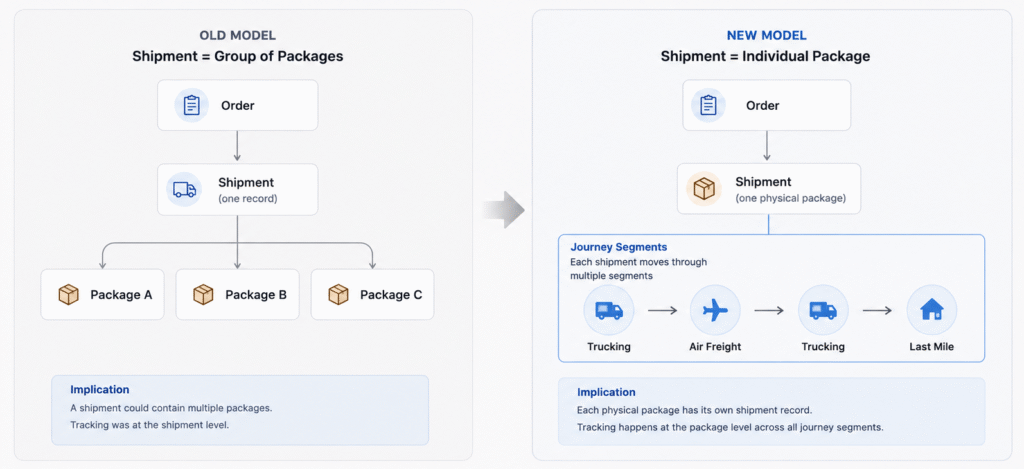
The underlying data model was changing
The most important design challenge came from the new shipment model.
Previous model: Order → Shipment → Multiple Packages
A shipment could represent multiple physical packages.
New model: Order → Shipment = Individual Package
Each physical package became an individual shipment.
The product also introduced segments to represent the different stages of a shipment journey.
For example:
Trucking → Air Freight → Trucking → Last Mile
This meant users now needed to understand several relationships:
- Which order does this shipment belong to?
- What physical package am I looking at?
- Where is it now?
- Which segment is currently active?
- What happened previously?
- What happens next?
- Does anything require attention?
The new product model provided more accurate information, but simply exposing all of that information would have increased cognitive load.
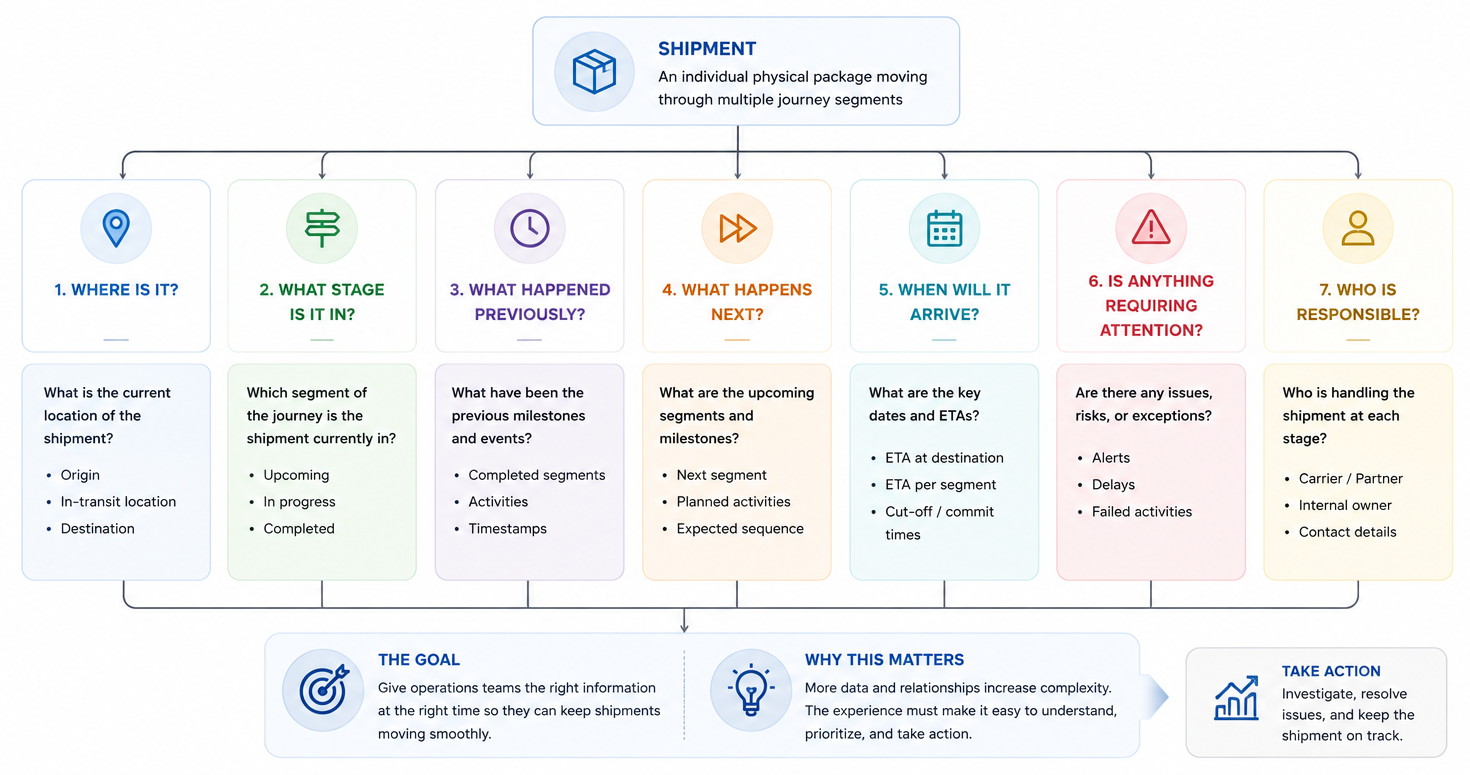
My design challenge
Expose the complexity of the system without exposing unnecessary complexity to the user.
5
Design Priorities
01
Surface what requires attention
Operations teams need to know which shipments may require intervention, not simply what is happening across every shipment.
02
Make complex journeys easy to understand
The interface should reflect the actual shipment journey instead of forcing users to infer progress from a simplified status.
03
Manage complexity progressively
Users should see the information they need for the current task first, with deeper information available when required.
6
Redesigning the Shipment Workspace
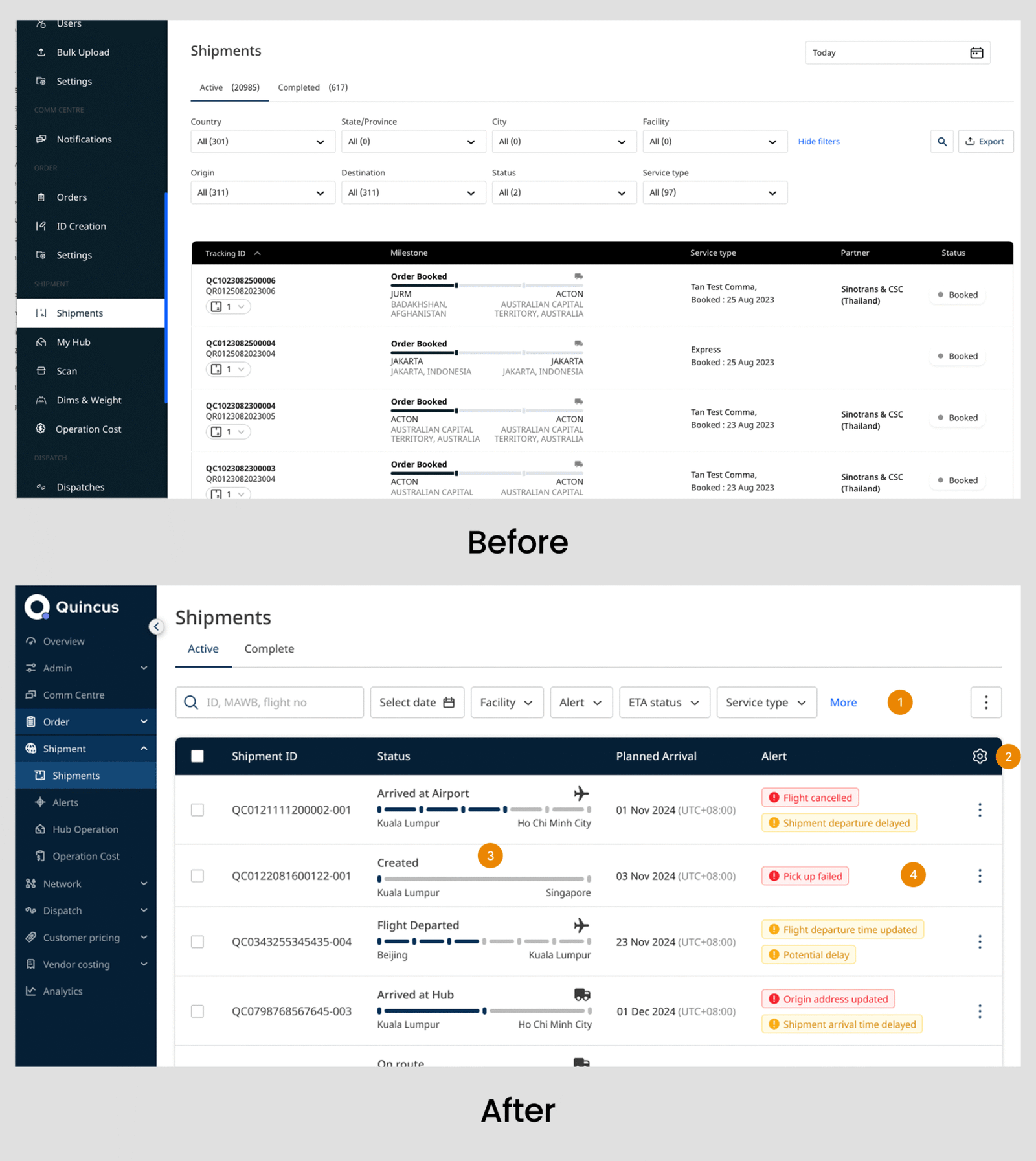
From a tracking page to an operational workspace
The Shipment Management page is where operations teams work with large amounts of shipment data.
I therefore designed the experience around the core workflow:
Find → Monitor → Identify exceptions → Investigate → Act
Rather than treating the page simply as a place to look up shipment information, the redesign aimed to help users quickly determine which shipments required their attention.
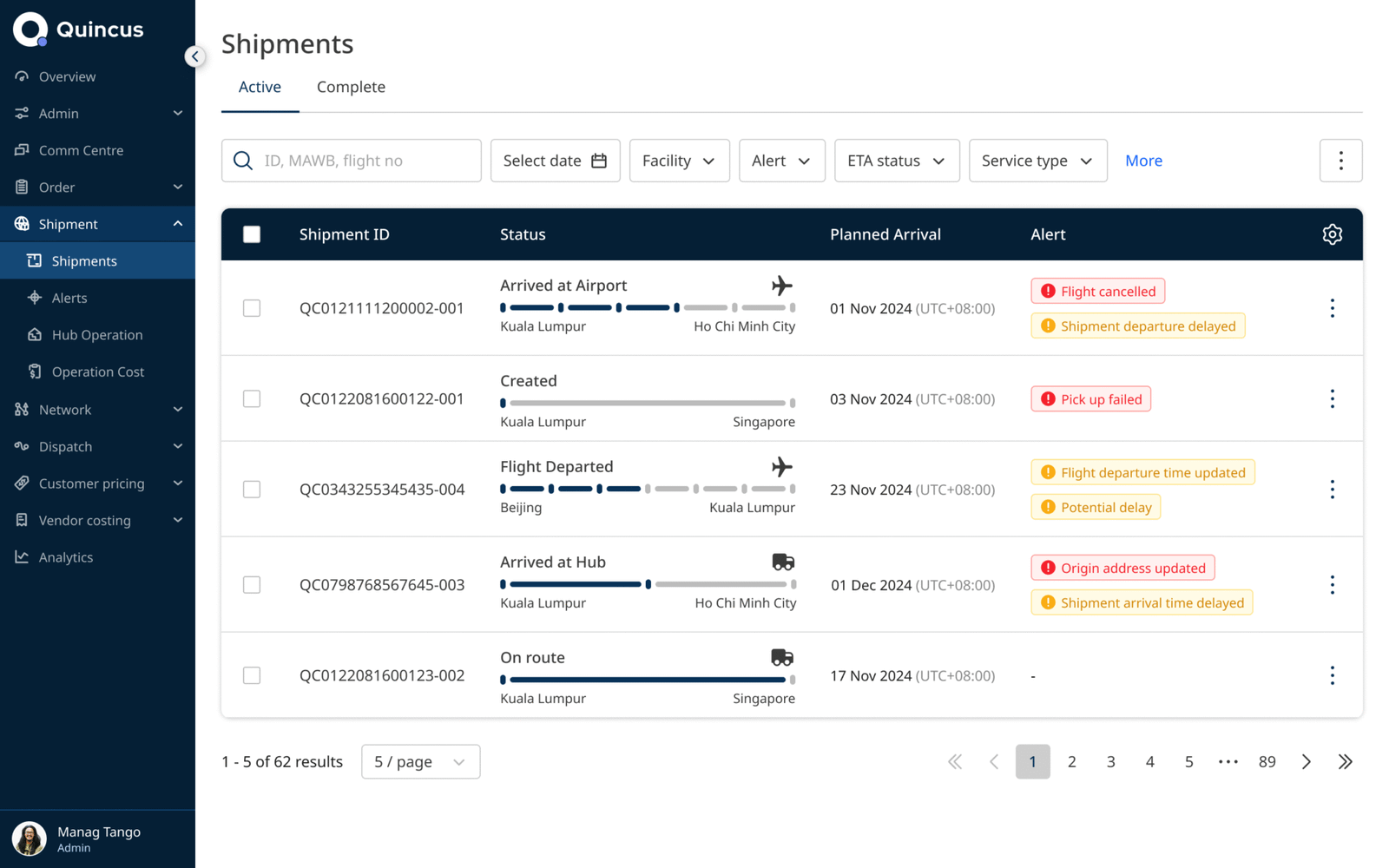
1. Unified Search and Filters
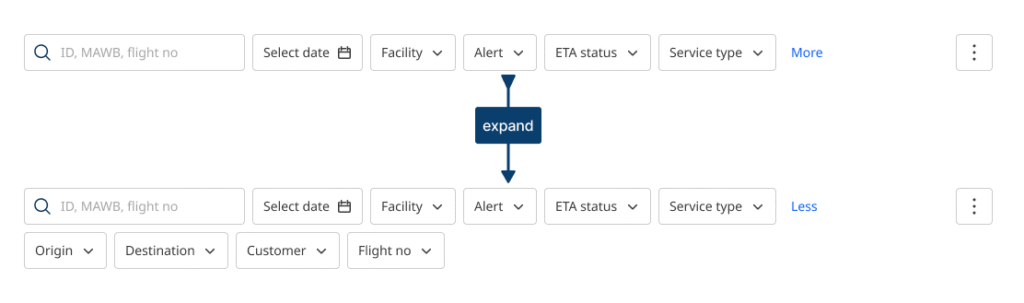
Problem
Search, date selection, and filtering controls were distributed across different areas of the interface. In addition, the filter labels were displayed outside the filter fields, creating an additional row of content above the results table. As users applied multiple filters, this area could take up significant vertical space and continuously push the shipment results further down the page.
This increased the effort required to refine a shipment list.
I consolidated the primary search and filtering controls into a predictable control area above the results table.
Frequently used filters remain visible, while less frequently used options are grouped under More.
Why
The goal was not simply to reduce visual clutter. It was to establish a clear interaction pattern where users could progressively narrow the shipment list without searching around the page for different controls.
2. Designing a More Flexible Shipment Table
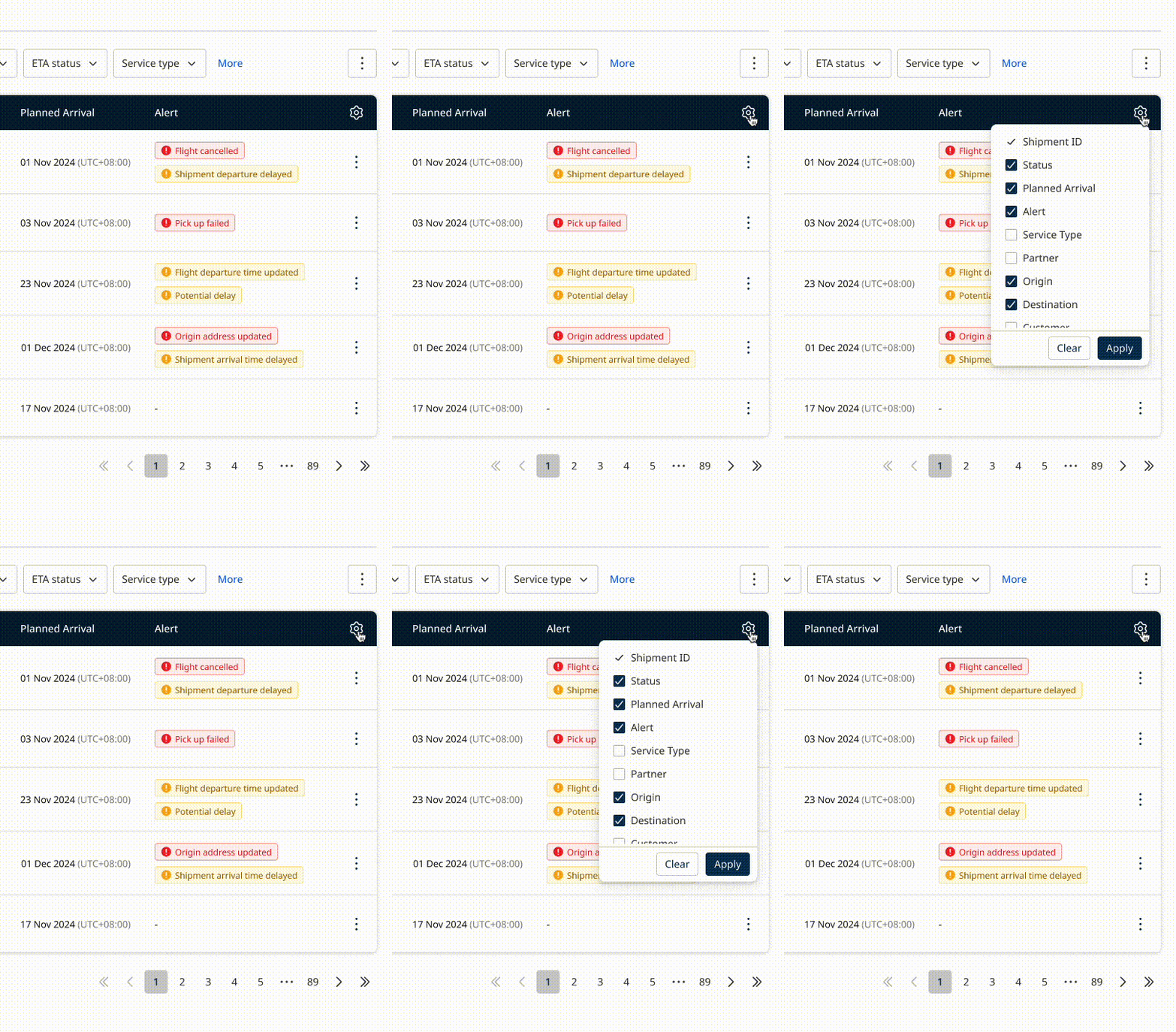
Problem
Different users need different pieces of shipment information.
Showing every possible field by default would make the table difficult to scan.
Design Decision
I introduced configurable table settings that allowed users to control:
- Visible columns
- Information density
Why
Instead of creating separate interfaces for different roles, the same workspace could adapt to different operational needs.
This also created a reusable pattern that could support future information requirements as the product evolved.
3. Replacing a Generic Status with a Real Shipment Journey
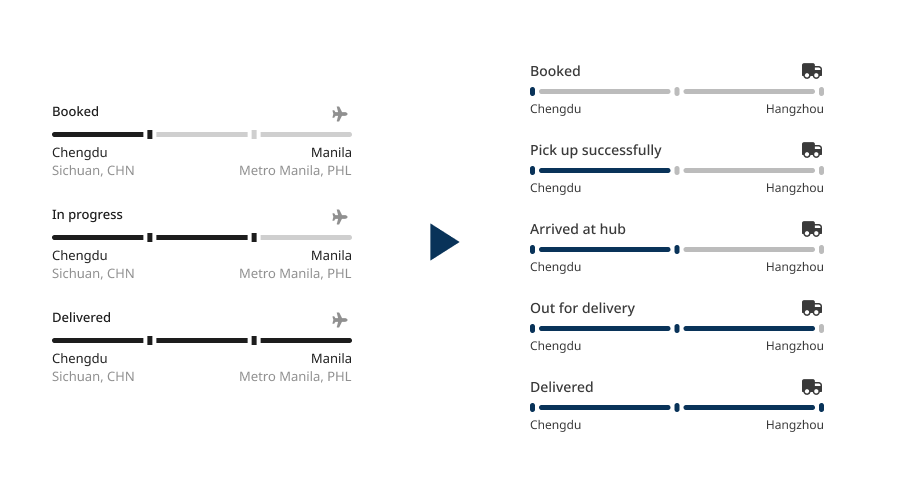
Problem
The previous status model was:
Booked → In Progress → Delivered
This worked for straightforward deliveries but did not accurately represent multi-leg journeys.
For example:
Flight Departed → On Route → Arrived at Airport → Pick up from Hub
A generic “In Progress” status could not tell the user which milestone the shipment was currently in.
Design decision
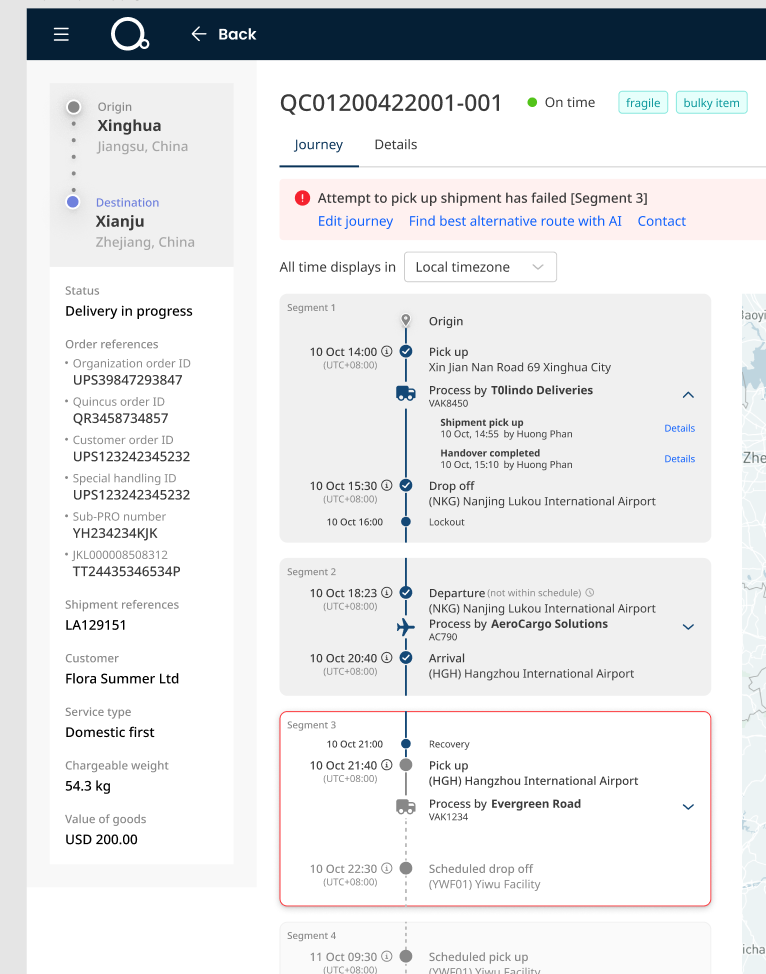
I redesigned the shipment status experience around the new segment-based journey model.
Each segment represents a meaningful stage of the shipment journey.
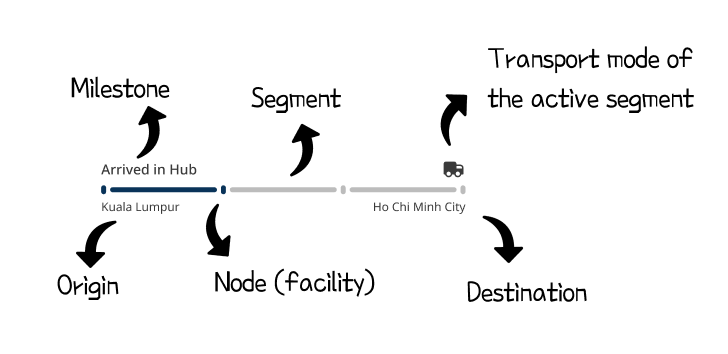
Result
Users can understand:
Where the shipment is now → what happened before → what happens next
without having to infer the journey from a generic status.
This was one of the most important changes in the redesign because it translated the new product model directly into a user-understandable mental model.
4. Designing for Exceptions
For an operations manager or team, shipment monitoring is not simply about knowing where a shipment is.
Their day-to-day responsibility is to identify potential problems early and take action before they affect the shipment journey.
This made exception visibility a critical requirement for the Shipment Management experience.
Problem
In the previous experience, users often had to inspect shipment information to discover whether something had gone wrong.
This meant an operational issue could remain hidden among a large volume of normal shipments.
For example, a failed pickup or potential delay might require the user to open a shipment and investigate before realising that attention was needed.
Design decision
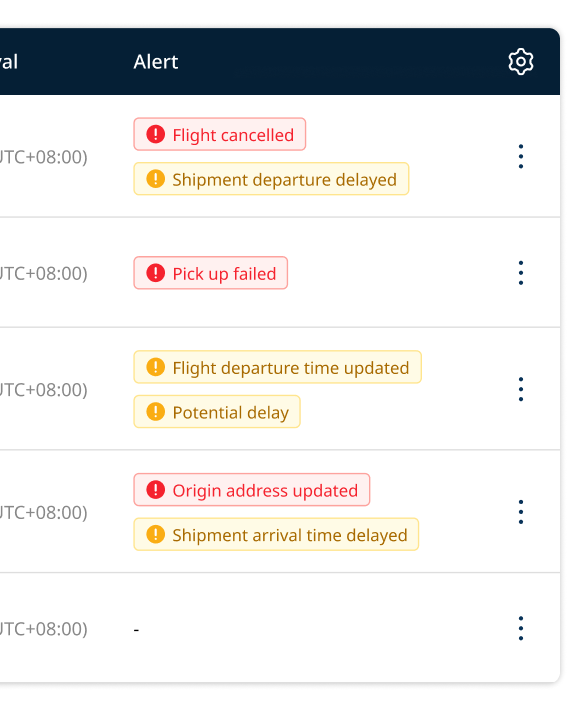
I introduced a dedicated Alert column directly into the shipment list to surface exceptions where operations teams were already monitoring their shipments.
Examples included: Pickup failed, Potential delay etc.
Rather than treating alerts as additional information, I designed them as operational signals that help users prioritise where their attention is needed.
Why this mattered
The goal was to change the workflow from:
Open → Inspect → Discover problem → Decide what to do
to:
Scan → Identify exception → Investigate → Take action
This allowed the shipment list to function not just as a tracking tool, but as an operational control centre for managing shipment health.
For an operations team managing a large number of shipments, the most valuable information is often not the status of every shipment, but which shipments may require intervention right now.
7
Bringing Activity and Journey Together
Users should not have to reconstruct a shipment's story across multiple views.
Problem
Previously, Activity and Journey were separate experiences.
Users had to move between pages and mentally connect What happened with What is happening now?
Design decision
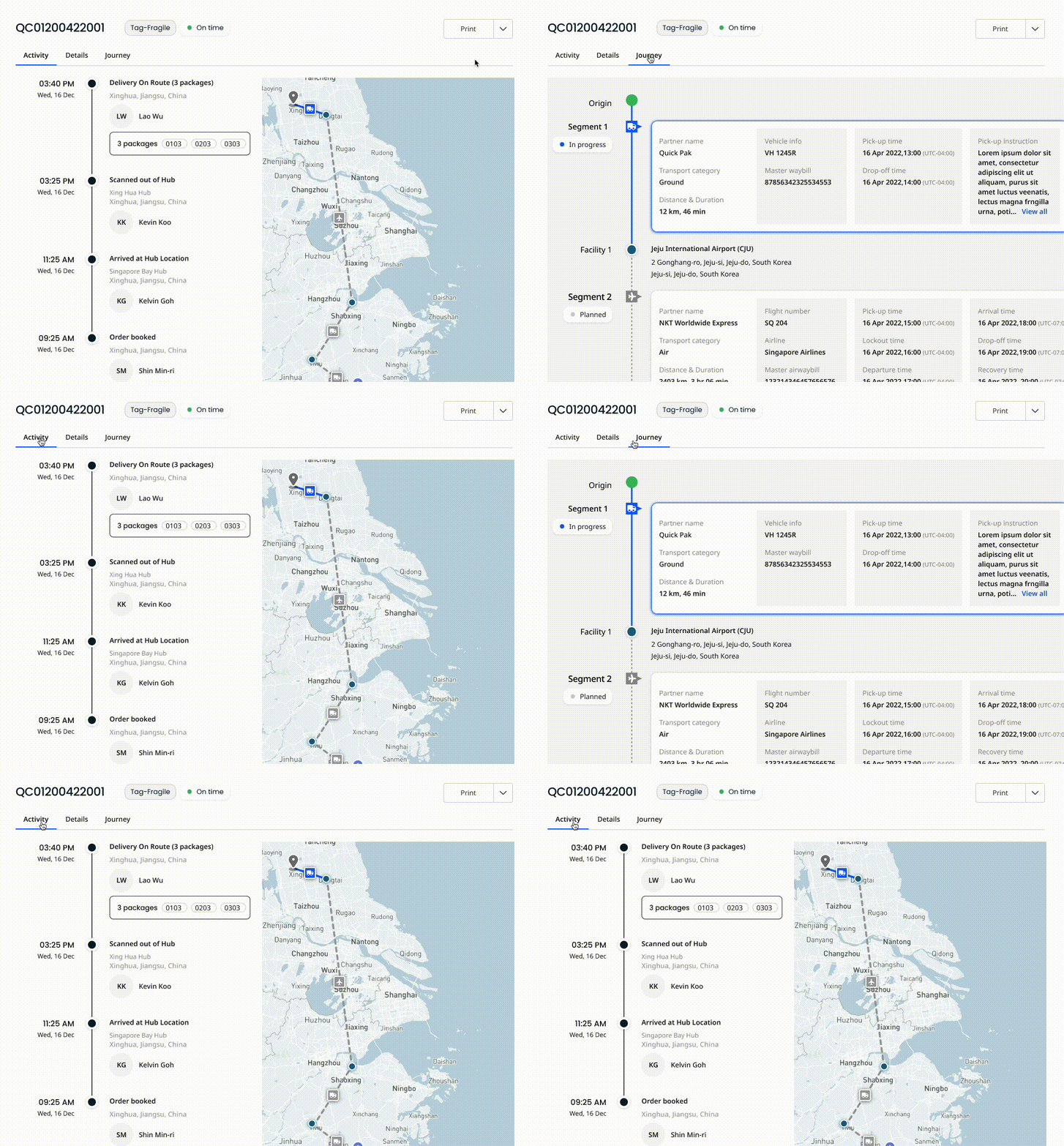
I combined Activity and Journey into a single continuous experience.
The new view communicates:
Where the shipment started → where it is now → what happens next
Each segment can be expanded when deeper information is required.
Why
The goal was not to show more information.
The goal was to give users one coherent mental model of the shipment.
The high-level journey remains scannable, while detailed information such as partner details and activities can be revealed progressively.
Turning Exceptions into Action
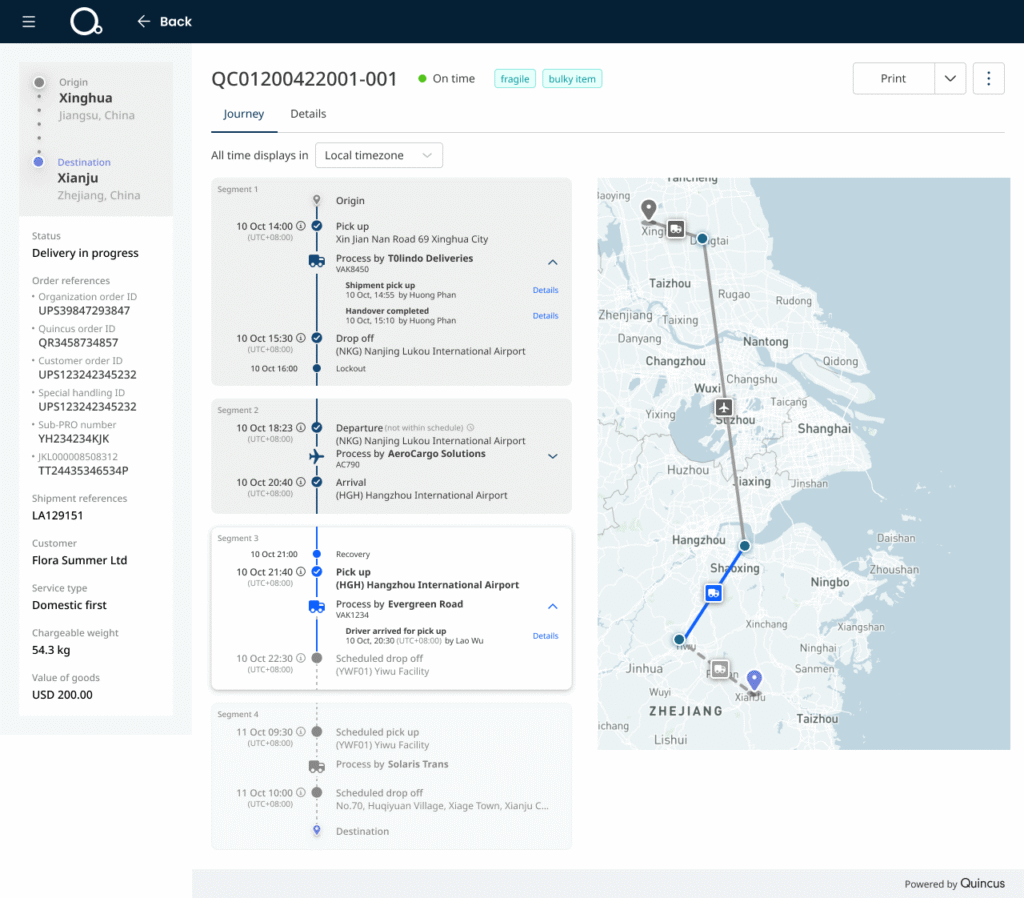
When an operations manager identifies an issue from the shipment list, they can open the affected shipment to investigate and take action.
The affected segment is clearly highlighted, while contextual actions help users respond quickly, whether by editing the journey, contacting the relevant party, or using AI-assisted route suggestions to find the best alternative route.
This helps turn shipment exceptions into a more actionable recovery workflow.
8
Redesigning the Shipment Information Page
The new product model required a new information hierarchy
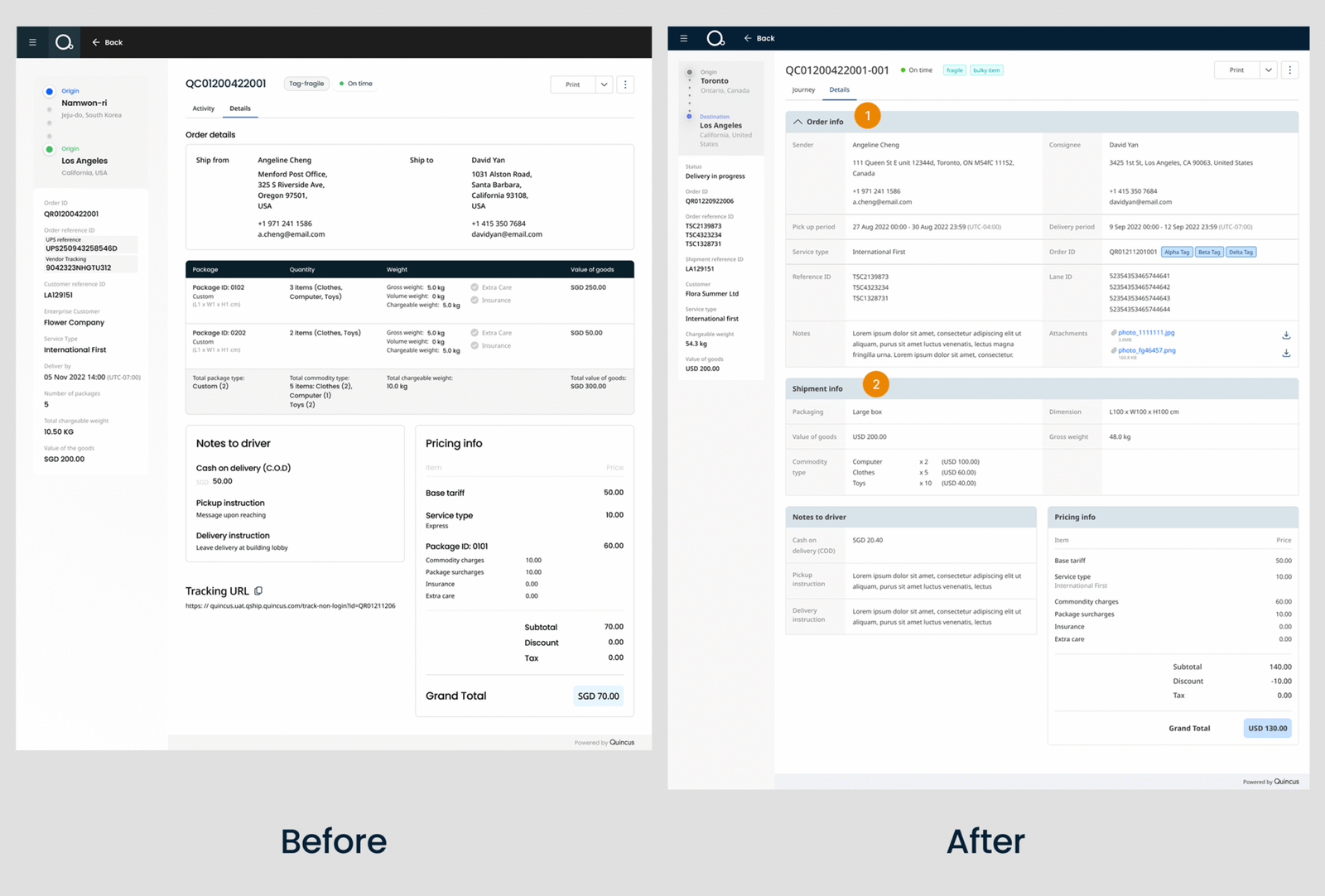
When each physical package became its own shipment, the Shipment Information page also needed to change.
The experience needed to answer a more specific question: “What is happening to this particular package?”
1. Prioritising operational information
Order-level information remains available, but it does not need to dominate the page.
I made secondary order information collapsible, creating more space for the information users are more likely to act on.
2. Focusing on the individual package
The redesigned page focuses on the physical package as the primary unit and users can see its specific package attributes.
This becomes particularly important when multiple packages from the same order are at different stages of their journeys.
9
Designing for Scalability
The new shipment and segment model introduced more complexity, but it also created an opportunity to establish reusable patterns across the product.
Key patterns included:
- Unified filtering
- Configurable data tables
- Segment-based progress
- Exception indicators
- Expandable information sections
- Consistent information hierarchy
Where possible, I translated these patterns into reusable components and states rather than designing one-off UI solutions.
This helped maintain consistency across the entire platform experience and made future extensions easier to implement.
10
Reflection
a. UX is connected to the data model
One of my biggest learnings was that interface design cannot be separated from how a product represents information.
When the definition of a shipment changed, it affected the entire experience — from navigation and tables to status, journey and detail pages.
A product designer needs to understand the underlying product logic, not just the interface.
b. Complexity should be managed, not simply removed
B2B products often cannot remove complexity because the underlying business process is complex.
This project taught me to use hierarchy, progressive disclosure and reusable patterns to make complex systems easier to operate.
c. Design for the system, not just the screen
The shipment redesign affected multiple parts of the product.
Thinking about the experience as a system helped me create patterns that could accommodate different shipment journeys, information requirements and future changes.
The most important shift in my thinking was from designing individual screens to designing a scalable product experience.
Good enterprise UX is not about making complex systems look simple. It is about making complex systems understandable and actionable.